How to host static files on GitHub pages?

GitHub is the best way to host static assets.
But most people don't know this so they tend to buy a hosting service that is not cheap.
From now on you are gonna host all your static websites on Github pages.
Let's understand everything about GitHub pages to host all HTML, CSS and JavaScript.
What are GitHub and GitHub pages?
Github is a provider of Internet hosting for software development and version control using Git. And Github pages is where you can host your static HTML, CSS and JS.
How to upload data to GitHub?
There are mainly three ways, to do this
Github website

You just have to make a repository and upload all the files
GitHub CLI

First you will need to download GitHub CLI software from this website.
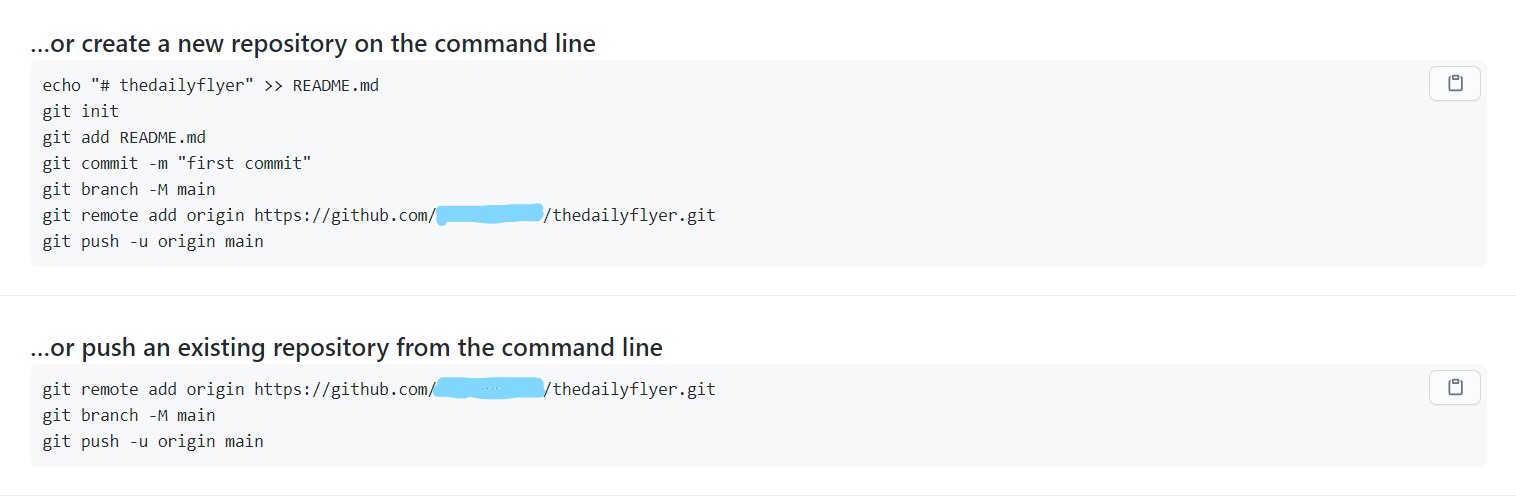
And the after you create a repository you will see some commands written like above.
You can run the command in command prompt or PowerShell.
Github desktop
This software is just an upgraded version of GitHub CLI it can do all the tasks easily and has good UI.
You will need to download this software and can create new repository directly from this software.
One thing to keep in mind is that your main HTML page file should be named as index.html to make it work.

If you keep the name of the file something else then it can work but you have to add the file name at the end of the URL.
How to enable GitHub pages?
You just need to go on the pages tab present in settings of your repository on which you want to enable GitHub pages on and you can select the branch for which you want your website to host on.
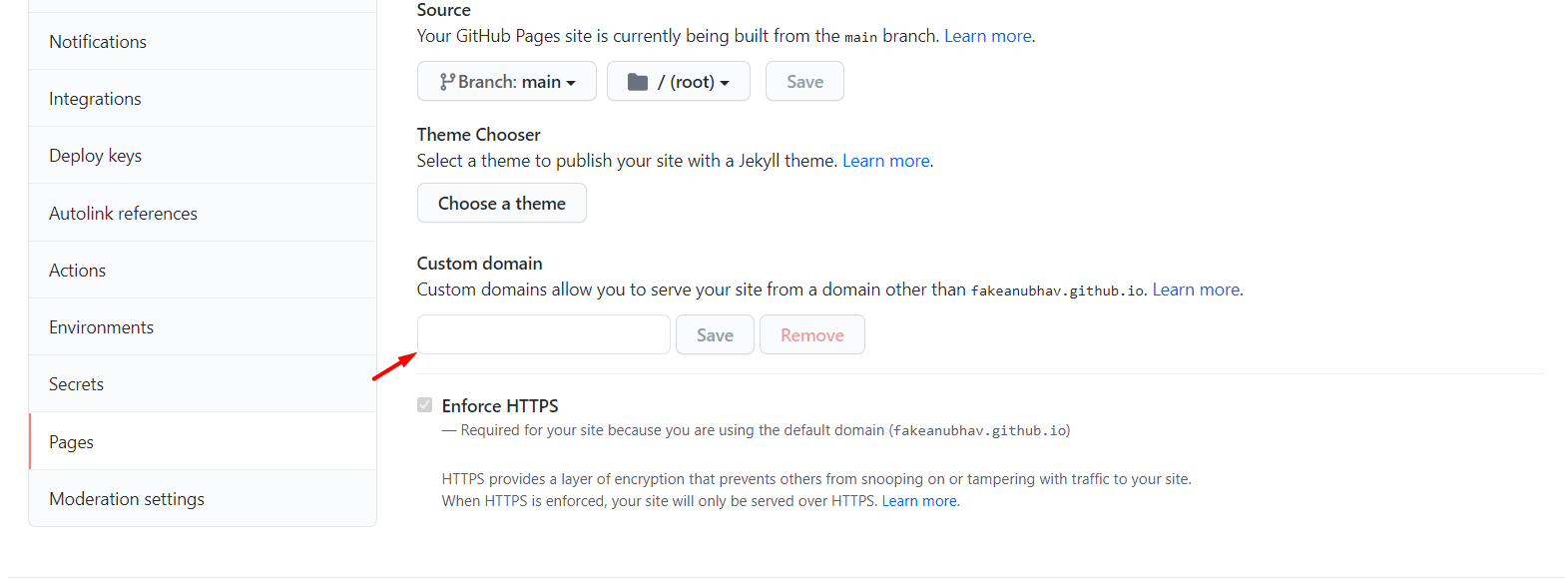
If you haven't created any branch that mostly it is there in the name of main or master.
You can select your branch from source option.
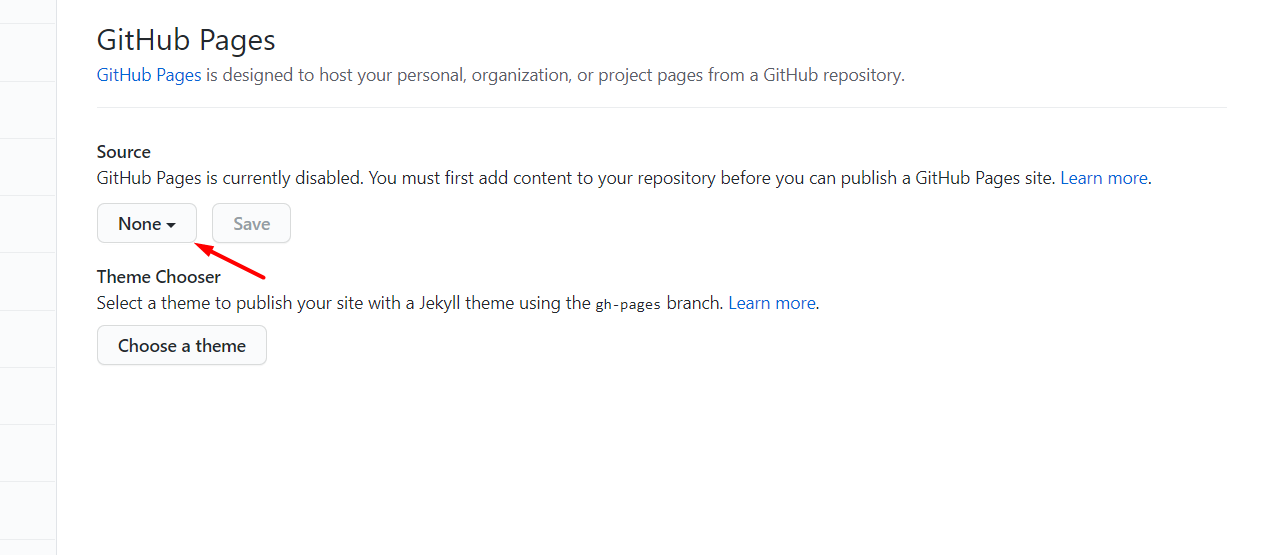
Click on save, that will create your URL for particular repository.
Now you will get the domain on the subdomain of github.io as your GitHub account name with the name of the repository at the end.
The URL for your website will look like this :
https://your-account-name.github.io/repository-name/
How to add your custom domain name?
You just have to change the DNS of your domain in DNS settings from the domain provider.
You have to point the domain to Github's IP or your Github's subdomain.
To do this first you have to go to the DNS manager of your domain name.
And then create a CNAME record that points to your GitHub subdomain.
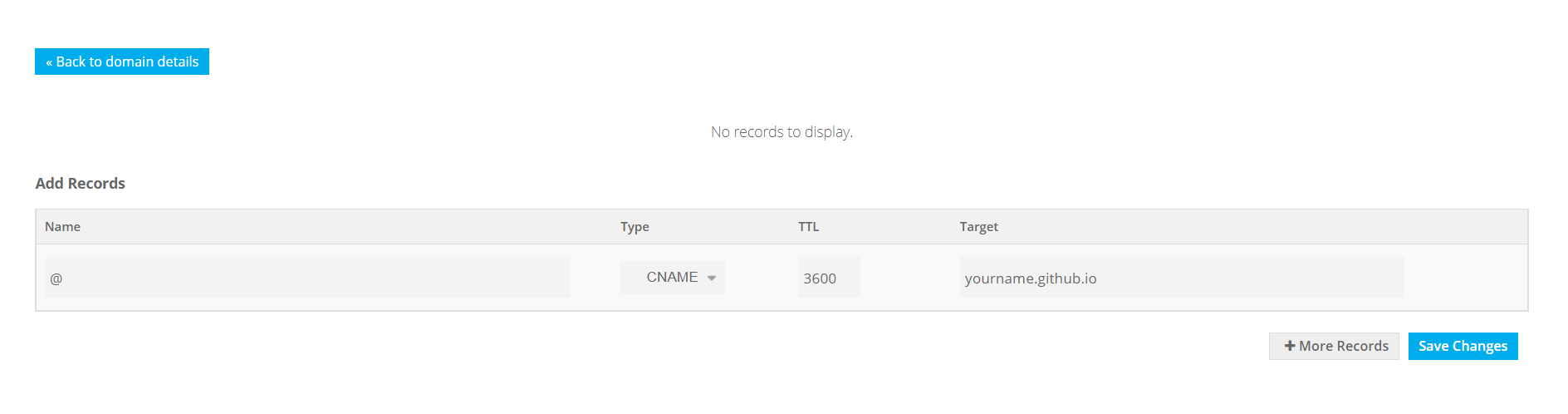
You can find this option somewhere in your DNS manager.
In the end, you just have to add that domain name to the custom domain field and click save in the pages tab in GitHub.
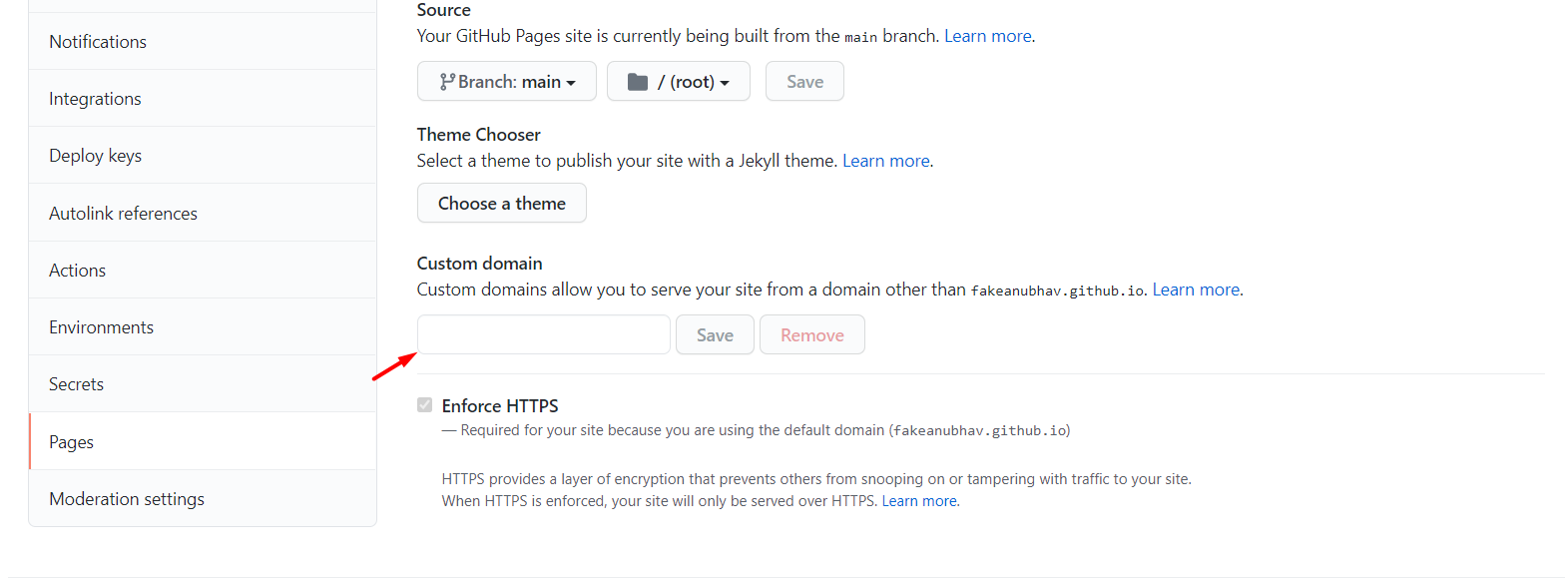
Github -> Repository -> Settings -> Pages
You can get a free domain from freenom to use, its not the best idea to use freenom's free domain but still a very good choice for showing off your new project to your friends.
Check the post on 3 best ways to get a free domain.
Add SSL to your website
If you are using a custom domain SSL doesn't come with it installed, you have to install the SSL certificate, GitHub provides a free SSL certificate you just have to enable from your page settings.
But, the best way to add an SSL certificate to your website is by using CloudFlare, which provides premium SSL and other security features such as saving your website form DDOS attack for free.
How to do this by Cloudflare?
Cloudflare is a CDN, a CDN is a set of distributed servers all over the world, which work together to provide fast delivery of data.
A CDN helps to load the assets of a website such as JS, CSS and HTML faster.
Cloudflare is free for non-commercial use, you can use it as a DNS manager you just have to use Cloudflare's nameservers in the DNS editor of your domain provider.
Please copy your own Name Servers provided by Cloudflare don't copy from below.
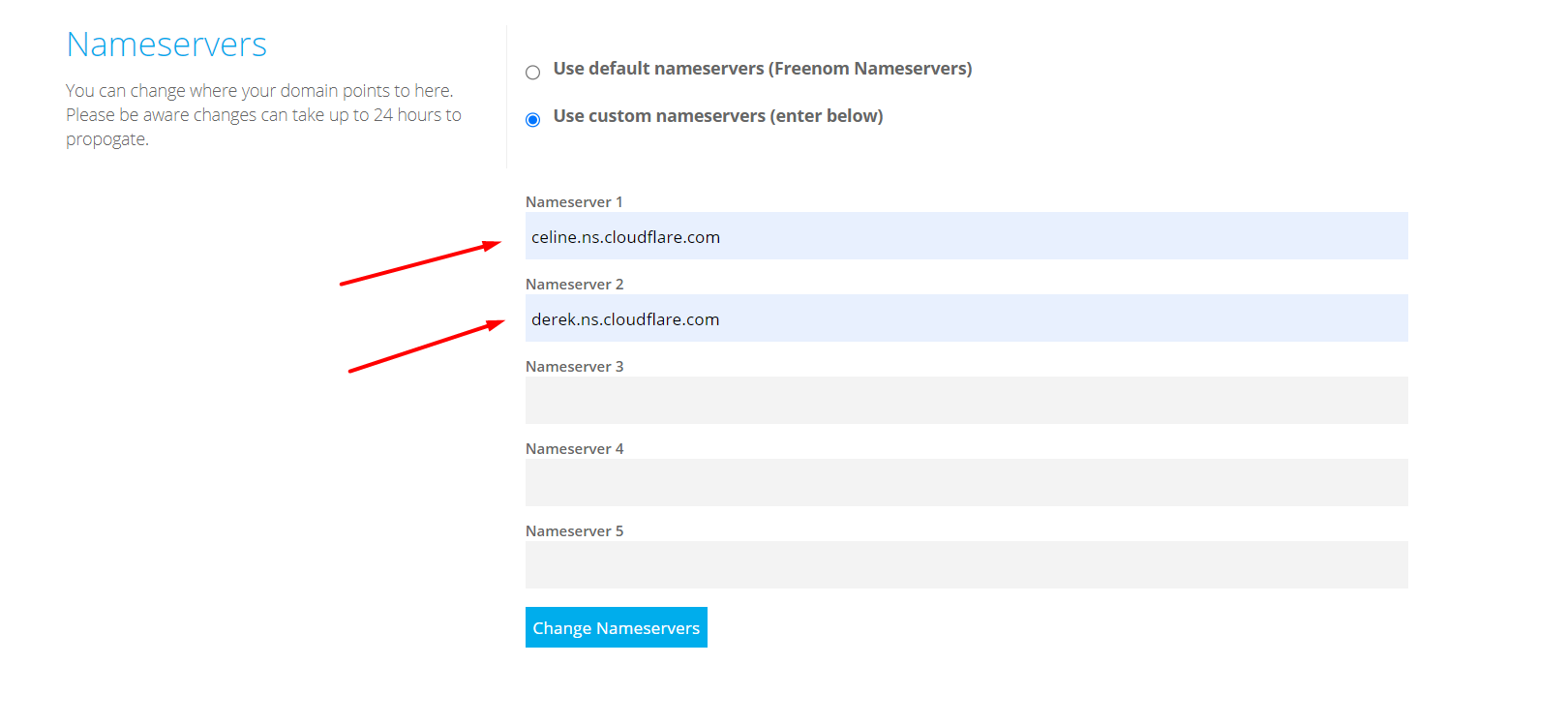
Your Domain Provider -> DNS Manager -> Nameservers
Now you can add the CNAME or A records in Cloudflare with even higher speed.
Using Cloudflare with github is just a cherry on top.
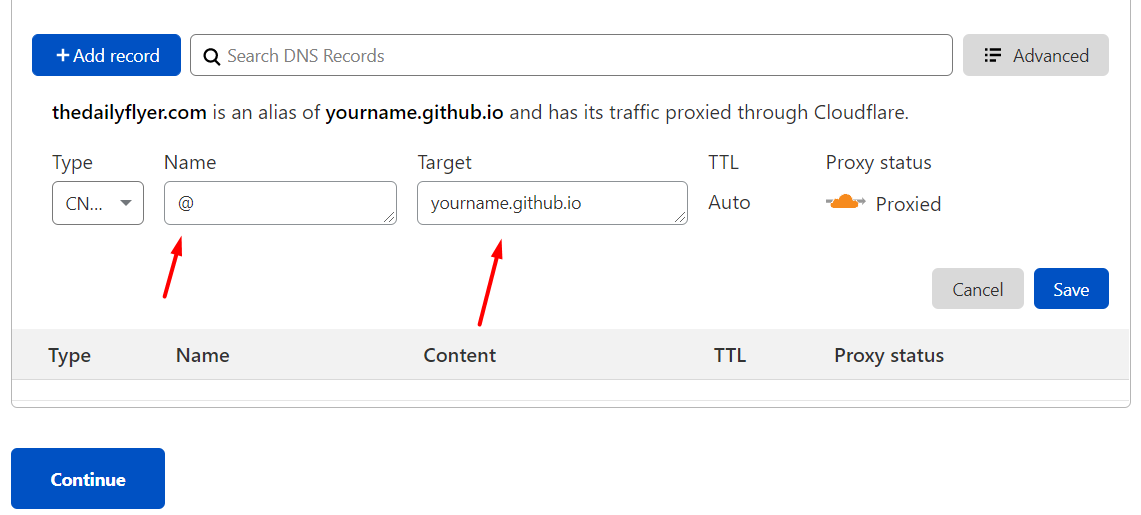
The @ represents the root of your domain, you have to use @ if you want to point the whole domain to somewhere else.
Why are GitHub pages better than other cheap hosting providers?
GitHub is a big company it hardly goes down it has an uptime of 99.9% so downtime is not a problem, and the speed is also much better than other cheap web hosting services.
Github also provided good speed to all the pages hosted on github and if you are using Cloudflare then you have the best speed possible.
Comments
Join the discussionNo comments yet. Be the first to comment.